Airtel 5G Internet in Kenya: Installation, Packages, Payment and How to Change Password
Internet connectivity has become an important part of everyday life in Kenya. From online classes and remote work to streaming movies and running businesses, a fast and reliable internet connection is now a necessity. To meet the growing demand for high-speed internet, Airtel Kenya introduced Airtel 5G Home Internet, offering customers faster browsing speeds and improved connectivity.If you are planning to install Airtel 5G internet in your home or office, this guide explains everything you need to know, including installation, payment methods, packages, and how to change your WiFi password.
What is Airtel 5G Home Internet?
Airtel 5G Home Internet is a wireless internet service that uses Airtel’s 5G network to provide high-speed internet connectivity.
Its usage and popularity has overtaken other traditional fiber connections that require cable installation Airtel 5G uses a router that connects directly to Airtel mobile network. This makes it easier for users to enjoy fast internet without complex installation.
Airtel 5G uses a router that connects directly to the Airtel mobile network.This makes it easier for users to enjoy fast internet without complex installations.
It is also portable and has a powerbank that stores energy for some hours.
Some benefits of Airtel 5G include:
- Faster internet speeds
- Easy setup process
- Wireless connectivity
- Support for multiple devices
- Suitable for streaming, gaming, online meetings, and downloads
- Airtel 5G Coverage in Kenya
Before purchasing Airtel 5G internet, it is important to confirm whether your area has 5G coverage. Airtel has been expanding its 5G network in major towns and urban centers across Kenya, including:
- Nairobi
- Mombasa
- Kisumu
- Nakuru
- Eldoret
- Thika
- Kiambu
Coverage continues to expand to more areas.
How to Install Airtel 5G Internet
Installing Airtel 5G internet is simple and does not require advanced technical knowledge.
Step 1: Purchase an Airtel 5G Router
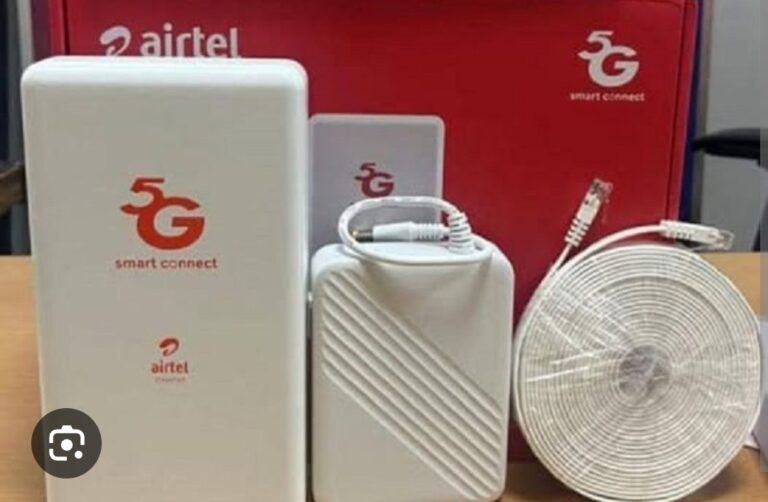
You first need to buy an Airtel 5G router from an Airtel shop or authorized dealer. The router usually comes with:
- Airtel SIM card
- Power adapter
- User manual Step 2: Insert the SIM Card
Most routers already come with the SIM card inserted. If not:
- Open the SIM slot
- Insert the Airtel SIM card correctly
- Close the slot securely Step 3: Connect the Router to Power
Plug the router into a power source and switch it on. Wait a few minutes for the network indicators to stabilize.
Step 4: Connect Your Device
Using your phone, laptop, or smart TV:
- Turn on WiFi
- Search for the Airtel router name (SSID)
- Enter the default password found on the router sticker
Once connected, you can start browsing immediately.
Airtel 5G Internet Packages in Kenya
Airtel Kenya offers different packages depending on your internet needs. Packages may change over time, but common plans include:
- Daily bundles
- Weekly bundles
- Monthly unlimited packages
The pricing usually depends on:
- Internet speed
- Data limit
- Duration of use
Customers can choose packages suitable for home use, business, or heavy streaming.
How to Pay for Airtel 5G Internet
There are several ways to pay for Airtel 5G packages in Kenya.
1. Airtel Money
You can pay directly using Airtel Money:
- Open Airtel Money
- Select Pay Bill or Buy Bundles
- Choose the internet package
- Confirm payment 2. M-PESA
Some Airtel services also support payment through M-PESA PayBill numbers provided by Airtel Kenya.
3. My Airtel App
The My Airtel App allows users to:
- Purchase bundles
- Check balance
- Renew subscriptions
- Manage router services 4. Airtel Shops
You can also visit an Airtel customer care shop for assistance with payments and package activation.
How to Change Airtel 5G WiFi Password
Changing your WiFi password is important for security and preventing unauthorized users from accessing your network.
Step 1: Connect to the Router
Connect your phone or computer to the Airtel WiFi network.
Step 2: Open Router Settings
Using a browser:
- Type the router IP address, usually:
192.168.1.1- or
192.168.8.1
Step 3: Log In
Enter the default username and password. In many routers:
- Username: admin
- Password: admin
You can find the correct details on the router sticker.
Step 4: Change WiFi Password
Your router may restart automatically.
Step 5: Reconnect Devices
After changing the password, reconnect your devices using the new password.
Tips for Better Airtel 5G Internet Speeds
To enjoy the best performance:
- Place the router near a window
- Avoid blocking the router with walls or metallic objects
- Keep the router elevated
- Restart the router occasionally
- Limit unnecessary connected devices Common Airtel 5G Problems and SolutionsSlow Internet
- Restart the router
- Move it to a better signal location
- Check if your package is active Cannot Connect to WiFi
- Confirm the password
- Restart your device
- Reset the router if necessary No Internet After Payment
- Wait a few minutes for activation
- Restart the router
- Contact Airtel customer care if the issue persists Final Thoughts
Airtel 5G internet is becoming a popular option for many Kenyans looking for fast and convenient home internet. The service is easy to install, flexible, and suitable for both home and office use.Whether you want internet for streaming, remote work, gaming, or online learning, Airtel 5G offers a modern solution without the need for complicated cable installations.By understanding how to install the router, pay for packages, and change your WiFi password, you can enjoy a smooth and secure internet experience.
Tags
Airtel 5G Kenya, Airtel home internet Kenya, Airtel 5G router setup, how to change Airtel WiFi password, Airtel internet packages Kenya, Airtel 5G installation guide, Airtel home WiFi Kenya, Airtel Kenya internet packages